

Introduction to project management techniquesConclusion
Project management techniques have become an essential aspect of modern businesses, allowing organisations to achieve their objectives, meet deadlines, and deliver value to their stakeholders. These techniques refer to the tools and methodologies that project managers and teams use to plan, execute, and control projects efficiently. Speak to our team Project management techniquesFAQs have been in existence for centuries, and they have evolved to meet the changing needs of businesses and the latest technological developments.Introduction
The history of project management techniques dates to ancient times when large-scale projects such as the construction of the pyramids and the Great Wall of China were undertaken. However, modern project management started to emerge in the mid-20th century with the development of techniques such as the Gantt chart and the Critical Path Method (CPM). As businesses became more complex and globalised, new methodologies emerged to address the diverse project needs of different industries.Project management software
Today, there are many project management techniques that project managers can use to achieve success. In this article, we will discuss 11 essential project management techniques that every has become an integral part of any modern business setting. These tools offer a centralised platform for teams to plan, organise, and track their work more effectively. The landscape of project management is constantly evolving, especially as workforces continue to grow more complex and remote teams become increasingly prevalent. project managerEfficient project management tools offer the following benefits:Choose your route should know. Each technique has its benefits and is suitable for different types of projects and organisational cultures. Project managers need to understand the various project management techniques available and choose the ones that best fit their projects and organisational cultures. They should also be adaptable to change as Streamlined collaboration and communication projectBetter task tracking and deadline management needs and circumstances evolve.Resource allocation
Project planning and visualisationReal-time progress trackingMSP qualification overview
Work Breakdown Structure (WBS)Improved productivity and efficiency.
The Project management tools Work Breakdown Structure help organisations optimise their workflows, eliminate bottlenecks, and complete projects on time and on budget. This guide is designed to provide you with the necessary information to help you select the right project management tools in 2025. In the following guide, we will cover the following topics: (WBS) is a project management technique that involves breaking down a project into smaller, more manageable components. It is a hierarchical decomposition of the total scope of work and provides a visual representation of all the tasks required to complete a project.The basics of project management toolsWhy us
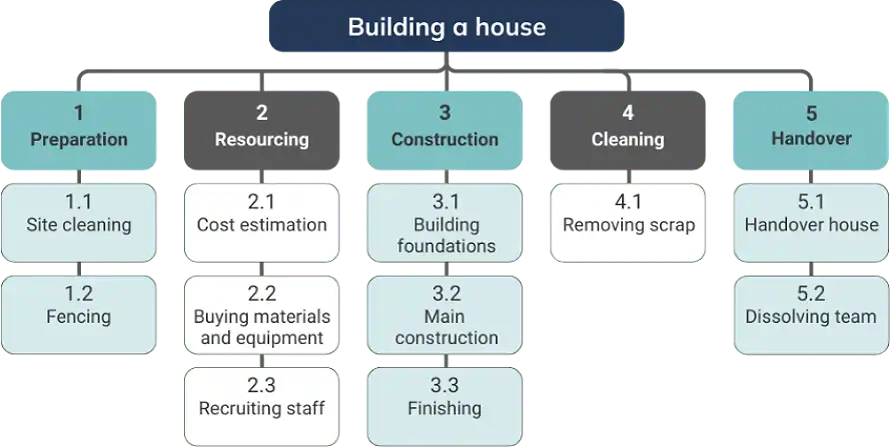
The essence of a WBS is to break down the final deliverable into smaller, more manageable components called work packages. It starts with the final deliverable at the top and is subdivided in a tree structure, where each level of detail represents an increasingly granular level of the project components. These components are typically organised into phases, deliverables, and work packages. By definition, WBS becomes more detailed as you go deeper into the tree. In The best tools to use depending on your business needs and budget project managementKey considerations to help you make an informed decision , WBS is used to:Implementation and adoption best practices
- Define and organise the total scope of a projectFuture trends that are going to take over the market.FAQs
- Ensure all the work required is included, and nothing outside the scope is addedNo matter if you’re the owner of a small business, a freelancer, or part of a large-scale enterprise, this article will help you find the right project management solution for your needs. We’ll look at the best free tools, paid options, and carefully compare all these tools to the following criteria: features, ease of use, scalability and more.
- Create a foundation for estimating costs, duration, and resourcesBy the end of the article, you should be able to select and implement a project management tool that will help your team reach new levels of success and take all your
- Assign responsibilities to team membersprojects
- Develop a to the next level.Click or scrollproject scheduleUnderstanding project management softwareChoose your route and budget.Definition and key features Whether you’re stepping up from projects, moving from PMO, or leading change, MSP gives you a structured route into programme management.
Developing a Project management software refers to a suite of digital tools and applications that enable teams to plan, execute, and monitor projects in an efficient and organised manner. These software solutions provide a centralised platform for collaboration, task management, resource allocation, and tracking project progress. Some key features commonly found in project management software include: Moving up from project managementWBSTask management If you’re already delivering projects and want to step up, MSP helps you manage multiple initiatives as one coordinated programme - with clearer governance, benefits focus and control of dependencies. typically requires input from the project team and stakeholders to ensure it is comprehensive and accurate. A WBS is usually presented as a tree diagram or outline, with each level representing an increased level of detail and each item on the same level representing a similar type of work. Note that the term ‘tree’ is used by many software systems and it is not necessarily drawn as a tree.: Allows users to create, assign, and track tasks or activities throughout the project lifecycle.
A WBS becomes the foundation for other Scheduling project management processes: Enables users to set deadlines, create timelines, and manage project milestones and dependencies.View MSP courses, including risk assessment, task assignments, and progress tracking. It helps the project team to provide a common structure for the whole project, and other details and activities are based on the work breakdown structure.Resource allocation
Gantt charts: Helps teams assign team members or resources to specific tasks and monitor their workloads. Working in PMO or governance
Gantt chartsCollaboration tools If you support reporting, planning or assurance, MSP gives you a structured programme management framework and common language - ideal for moving from oversight into leading programmes. are one of the most widely used and recognised project management techniques. They provide a visual timeline for the project and can display the relationships and dependencies between different tasks or activities. Gantt charts have a long history, with their use dating back to the early 1900s when they were popularised by Henry Gantt, a mechanical engineer and management consultant. In recent years, Gantt charts have transitioned from physical, hand-drawn charts to digital project management tools.: Facilitates communication, file sharing, and document collaboration among team members.
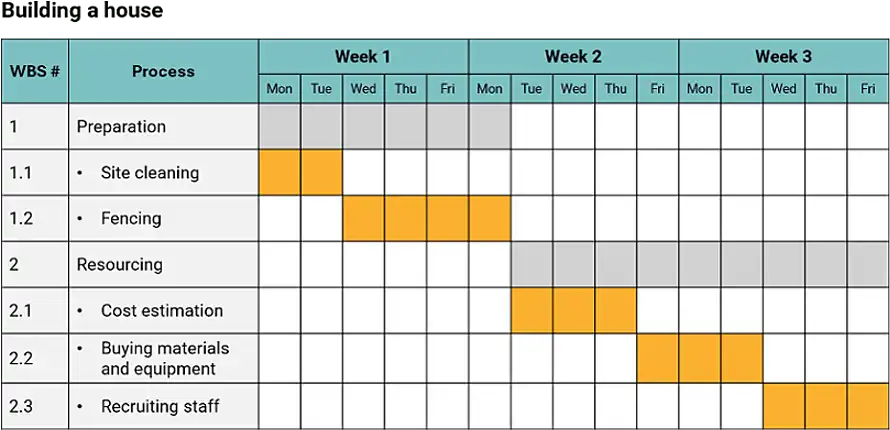
A Gantt chart typically consists of a horizontal bar chart with the project tasks listed on the vertical axis on the left side and the time periods spread across the top. The project tasks are then represented by horizontal bars spanning the time periods in which they are scheduled to be performed. The length of the bar indicates the duration of each task. This format allows Reporting and analytics project managers: Offers reporting capabilities and analytics to generate insights on project performance, progress, and resource utilisation.View MSP courses and team members to:Time tracking
- Clearly visualise the project timeline and the duration of each task: Allows users to monitor the time spent on tasks or projects for time management and billing purposes. Leading change across workstreams
- Identify dependencies and relationships between tasksBudget management If you’re coordinating complex change with multiple teams, MSP helps you align work to outcomes, manage stakeholder expectations, and keep delivery moving through clear programme governance.
- Track progress against the planned schedule: Provides tools to track expenses, manage project finances, and compare against budget estimates.
- Allocate resources to tasksBenefits of using project management tools
- Communicate the project timelines to stakeholders.Project management tools offer numerous benefits for organisations, teams, and individual project managers. Some of the key advantages include:View MSP courses
Some modern Gantt chart software provides additional features such as colour-coding of tasks, milestone markers, and linking of dependent tasks. Some tools also allow for resource allocation and workload management directly from the Gantt view.Enhanced productivity
Gantt charts are most useful when you want to provide an overview of the entire project. However, for large and complex projects, they may become cluttered and difficult to read. Despite this, Gantt charts remain a popular tool for project managers because of their intuitive design and ability to communicate complex scheduling information quickly and clearly.: Project management tools help streamline workflows, automate tasks, and eliminate inefficiencies, leading to increased productivity.New to project or programme delivery?
Project network diagramsImproved communication You can still start with MSP. Many learners use it to understand how programmes are structured and governed, then build experience by supporting or managing workstreams as they progress.
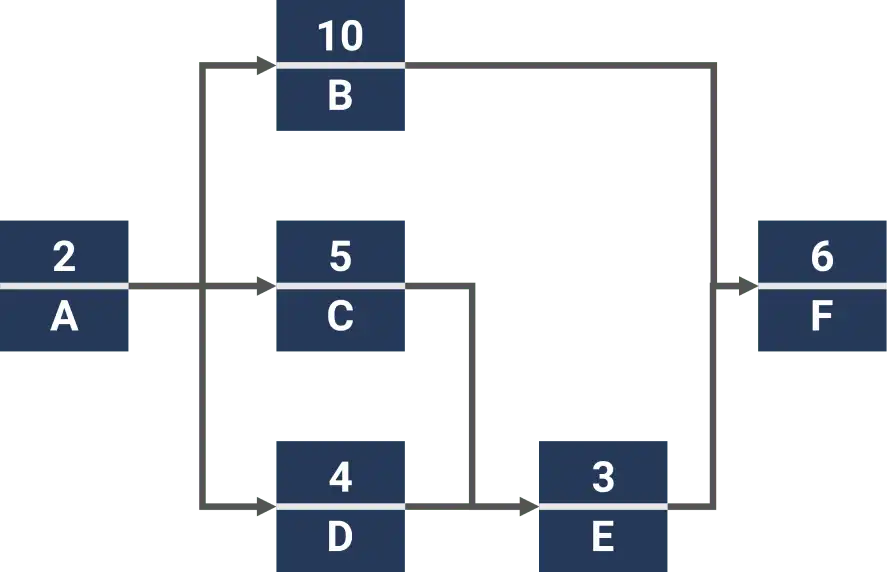
Project Network Diagrams: These tools facilitate seamless communication and information sharing among team members, reducing misunderstandings and delays. , as the name implies, are graphical representations of a project’s tasks and their relationships, showing how the project activities are sequenced and interrelated. These diagrams provide a visual depiction of the project flow and are commonly used in project management methodologies that include Critical Path Method (CPM) and Program Evaluation and Review Technique (PERT).Better resource utilisationMSP qualification overview
Network diagrams typically use nodes to represent tasks or activities and arrows to indicate dependencies between these tasks. They allow for a clear visualisation of task sequences and can help project managers identify potential bottlenecks or critical paths in the : Project management software assists in optimising the allocation of personnel, budgets, and other resources, leading to more efficient use of resources.Programme management is about coordinating related projects and workstreams to deliver outcomes and measurable benefits. MSP provides a structured approach to setting direction, establishing governance, and keeping a programme on track through change.project scheduleIncreased accountabilityWhat MSP helps you do:.: Clearly defining roles, responsibilities, and tasks within projects helps increase accountability among team members.Define outcomes and benefits, not just outputs

Key takeawaysReal-time visibilitySet up governance, roles and decision-making
- Visual representation of task dependencies: Project management tools provide real-time visibility into project progress, enabling teams to track milestones, identify bottlenecks, and address issues proactively.Manage dependencies and risks across multiple initiatives
- Identify critical path and potential schedule risksData-driven decision makingKeep stakeholders aligned and engaged
- Facilitate resource allocation and schedule optimisation.: Access to analytics and reporting capabilities allows teams to make informed decisions based on data and insights.Maintain control as priorities and circumstances change
Quick tipsStandardised processesWhere to start
- Begin with a clear list of all project tasks and their dependencies.: Project management tools help establish standardised methodologies and processes across projects, improving consistency and efficiency.If you’re new to MSP, Foundation is the usual starting point. Practitioner is designed for applying MSP in real programme scenarios once you know the framework.
- Use software tools for easy creation and updating of network diagrams.Remote work support
- Regularly review and update the diagram as the project progresses.: These tools enable effective collaboration and project management, even for distributed teams or remote workers.View MSP courses
- Utilise color-coding to highlight critical paths or high-risk activities.Types of project management softwareWhy choose Knowledge Train?
Common pitfallsCloud-based vs on-premise solutions Whether you’re aiming for your first programme role or strengthening governance capability, we make it easy to learn with confidence.
- Overlooking important task dependencies.Project management software can be classified into two main categories based on their deployment models: Recognised programme management route
- Creating overly complex diagrams that are difficult to understand.Cloud-based solutions
- Failing to update the diagram as project scope or timelines change.Hosted on remote servers and accessed through web browsers. Learn MSP as a structured approach to leading programmes and delivering benefits.
- Neglecting to consider resource constraints when analysing the network.Advantages: Low initial costs, automatic updates and maintenance, accessibility from any device with an internet connection. Expert trainers, practical learning
By learning project network diagrams, managers can enhance their ability to plan, schedule, and control complex projects effectively.Disadvantages: Dependence on internet connectivity, potential security and privacy concerns.
- Scalable from small teams to enterprise-level
- Strong security features and measures in place.
- Cons
- Limited storage space in the free plan
Some advanced features locked behind higher-tier plans
- Steeper learning curve for new users.
- ActiveCollab
- ActiveCollab
- is a project management software that is catered to freelancers and small teams that need basic project tracking functionality. The free plan offers many basic features useful for smaller projects.
FeaturesTask management and team collaborationTime tracking and workload management
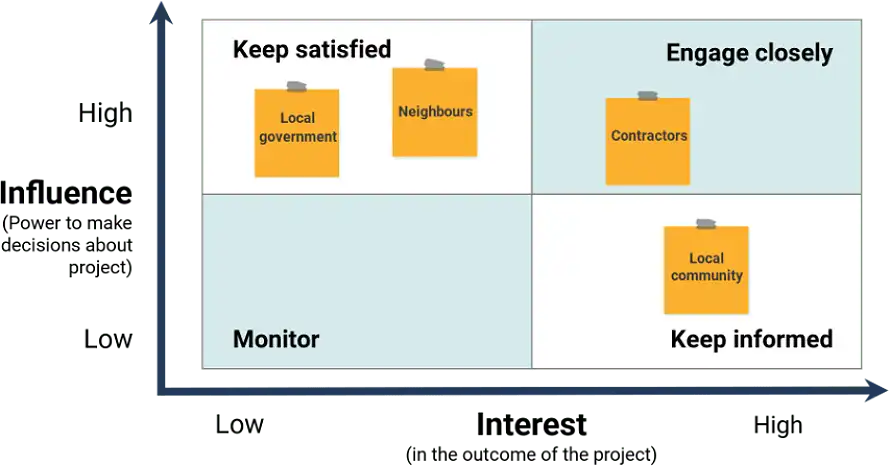
Stakeholder mappingBasic invoicing capabilitiesTerms
File sharing and storageEmail integration.
Pros
- Simple, no-frills, user interface
- Built-in time tracking and invoicing tools
- Good for client-based projects.
- ConsLimited features in the free planLacks more advanced reporting and analytics
Free plan does not scale well for large teams.
- Paid solutions for small to medium businesses
- Monday.com
- Monday.com
- is a customisable work operating system that offers flexible workflows for any type of project. It is known for its bright, colorful, and easy-to-use interface.
- Key features
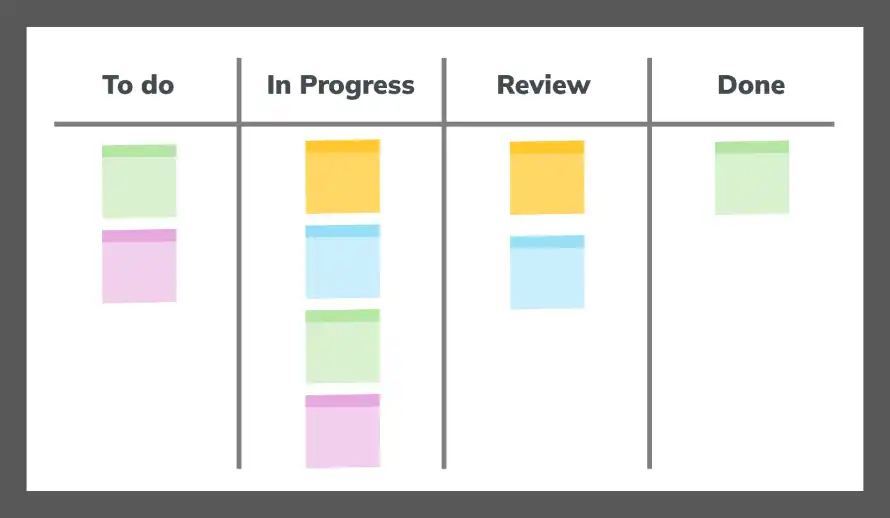
Multiple board views (Kanban, Gantt, timeline)
- Customisable templates and workflows
- Automation and integration with other apps
- Time tracking and workload management
- Reporting and analytics.
- Pros
Highly visual and intuitive interface
Steeper learning curve for users who are not familiar with spreadsheets
Can be overwhelming due to its many features
Higher price point compared to some competitors.Pricing
Plans start at $7 per user per month (annual billing)
- Celoxis
- Celoxis
- is a project management platform that is designed for mid-sized to large businesses. It offers a comprehensive set of features for project and portfolio management and can be deployed either as a cloud-based or on-premises solution.
Key features
- Resource management and capacity planning
- Financial management and budgeting
- Custom fields and workflows
- Interactive Gantt charts
Client portal for stakeholder collaboration.
- Pros
- All-in-one solution for project and
- portfolio management
Strong financial tracking and forecasting features
- Customisable to fit a variety of industries.
- ConsInterface may feel dated compared to more modern platformsCan be complex and overwhelming for small teams or simple projects
- Higher price point than some competitors.
- Pricing
Plans start at $22.50 per user per month (annual billing).
- Zoho projects
- Zoho Projects
- is a project management platform that is part of the larger Zoho suite of business tools. It is a cost-effective solution for small to medium-sized teams and offers a good balance of features and affordability.
- Key features
Gantt charts and critical path analysis
Time tracking and invoicing integrationIssue and bug tracking
Document management and collaboration
- Integration with other Zoho apps.
- Pros
- Competitive pricing for the features offered
- Strong integration with other Zoho products
- User-friendly interface with customisable dashboards.
Cons
- Limited third-party integrations compared to some competitorsSome advanced features only available in higher-tier plans
- May feel limited for large, complex projects.
- Pricing
Plans start at $4 per user per month (annual billing)
- Enterprise-level project management software
- Microsoft Project
- Microsoft Project
- is a robust project management software, built for use on large and complex projects. It’s a solid choice for organisations that are already entrenched in the Microsoft ecosystem.
Key features
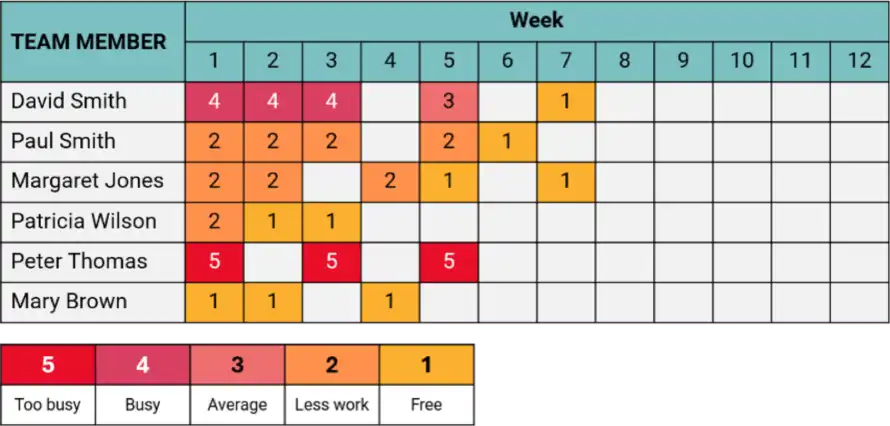
- Advanced scheduling and resource management
- Portfolio management capabilities
- Comprehensive reporting and analytics
- Integration with other Microsoft products and tools
On-premise and cloud-based deployment options.
Pros
Extensive and robust features for complex project planning
- Seamless integration with Microsoft 365 suite
- Highly scalable, suitable for large enterprises.
- ConsSteep learning curve for new usersComparatively high cost versus other solutions
Can be overly complex for smaller, less intricate projects.
- Pricing
- Pricing starts at $10 per user per month (cloud-based version).JiraJira
- is an Atlassian-built project management tool that, while primarily targeted at software development teams, can be customised for a variety of other project types. It has a particular strength in supporting
- Agile methodologies
.
- Key features
Less well-known compared to some other tools
May not include some of the specialised features of industry-specific tools
Pricing may be less competitive for smaller teams.PricingCustom pricing based on team size and needs.
Niche and specialised tools
Airtable for customisable solutions
Airtable
is a flexible tool that blends the familiar spreadsheet interface with the power of a database, making it highly adaptable for project management and beyond.
Key features
Customisable bases (think of them as databases) and viewsRich field types including attachments, images, and formulasWide range of templates for various use cases
Automation and integration features
API access for custom development.
