
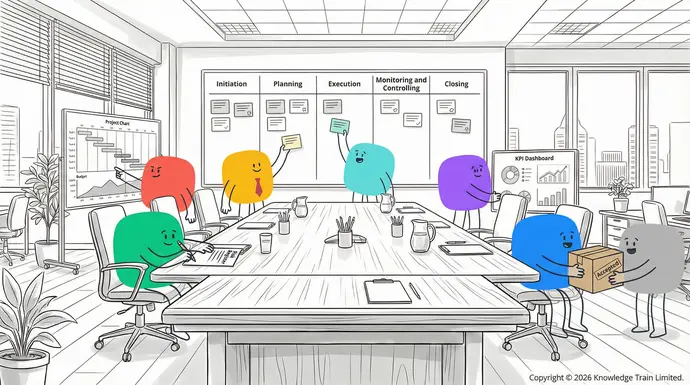

- : Project management tools help streamline workflows, automate tasks, and eliminate inefficiencies, leading to increased productivity.: Measure and track project progress, performance, and quality to ensure they align with the plan. Adjust as necessary to keep the project on track.Improved communication
- Closing: These tools facilitate seamless communication and information sharing among team members, reducing misunderstandings and delays.: Deliver the final product or service, conduct a project review, document Better resource utilisationlessons learned: Project management software assists in optimising the allocation of personnel, budgets, and other resources, leading to more efficient use of resources., and archive project documents.Increased accountability
Importance of understanding the project lifecycle: Clearly defining roles, responsibilities, and tasks within projects helps increase accountability among team members.
Understanding the project lifecycle can help project managers to:Real-time visibility
- Plan for potential problems and stay one step ahead: Project management tools provide real-time visibility into project progress, enabling teams to track milestones, identify bottlenecks, and address issues proactively.
- Manage resources effectively during the projectData-driven decision making
- Keep stakeholders informed throughout the project: Access to analytics and reporting capabilities allows teams to make informed decisions based on data and insights.
- Respond to changes in the project without losing controlStandardised processes
- Uphold quality standards throughout the project.: Project management tools help establish standardised methodologies and processes across projects, improving consistency and efficiency.
Project managers can do all these things when they become familiar with the phases in the project lifecycle.Remote work support
1. Project initiationThe choice between different types of project management software depends on factors like organisational requirements, budget constraints, industry regulations, and specific project needs. By considering these factors, teams can select the most suitable solution to effectively manage their projects and optimise efficiency.
Project initiation phase is important for the success of a project. During this stage, the ideas start to take shape, and the vision and purpose of the project are established.Enhance your skills with our expert-led courses
Developing a business case
The business case is a justification for a project and a description of the benefits the project will bring. To develop a Instructor-ledbusiness caseIntroduction to Project Management course:
- Identify the problem/opportunity the project is solving
- Consider different solutions and evaluate their feasibility£499 +vat
- Calculate the cost, benefit and return on investment
- List the risks and mitigation measures.See all dates
Defining project goals and scope
Project goals and scopeInstructor-led need to be well-defined to have a successful project. To define the goals and the scope:Project Management Essentials
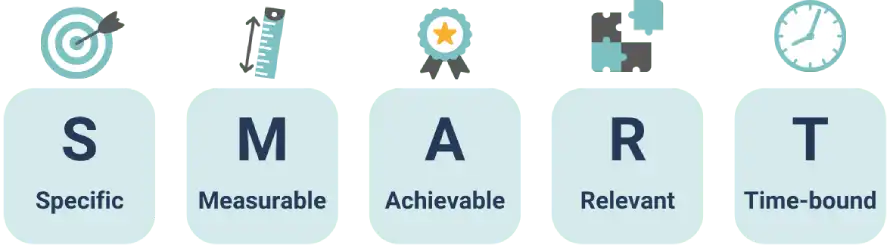
- Set SMART (Specific, Measurable, Achievable, Relevant, Time-bound) goals
- List the deliverables and the project boundaries£899 +vat
- Identify constraints and assumptions.
Creating a project charterSee all dates
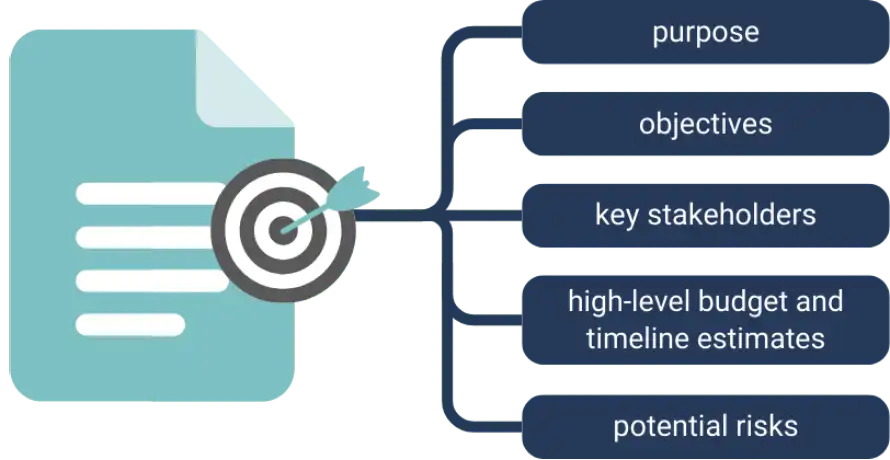
The Top project management tools for 2025project charterHere, we’ve researched dozens of project management tools and put together lists that can fit virtually any team size, budget, or industry. These tools are organised in terms of price points from free to enterprise to give you a good idea of what features and benefits you can expect from each tool. Let’s dive in and find the right project management tool for your team! serves as the project’s formal authorisation document. It should include:Free tools
| Key ElementsTrello | DescriptionTrello |
|---|---|
| Project purpose is a visual project management software that employs a Kanban-style board view with cards that you can move as you work on a project. It is an extremely easy-to-use and simple app that is great for small teams and individuals. | Clear statement of the project’s objectivesFeatures |
| ScopeCustomisable boards and cards | High-level description of what’s included and excludedDrag and drop cards |
| TimelinesBasic automation rules with Butler | Estimated start and end datesFile attachments and comments |
| BudgetIntegrations with popular apps and services. | Initial cost estimatesPros |
| Key stakeholdersEasy to get started and use | List of individuals or groups with vested interestQuick to set up and start tracking work |
Identifying key stakeholdersVisually appealing and clean design
Stakeholder identificationGenerous free plan with unlimited boards and users. is an important part of the successful project. To manage your stakeholders, first make a stakeholder register of all the parties involved and then map out their interests, influence, and impact on the project. Lastly, create a communication strategy for each stakeholder.Cons
When each of these components has been properly considered during the initiation phase, a project manager has set the stage for the rest of the project lifecycle.Reporting is not very robust
2. Project planningCan get messy with more complex projects
The planning process is vital in ensuring that a project will be successful. It involves the development of a Advanced features require paid plans.project planAsana.Asana
The is a highly versatile task and project management tool that provides features useful to teams of all sizes and skill levels. The free version offers many of the main features to help project plantrack projects elaborates on the project charter. It includes the following major components: the technical requirements, the and tasks.work breakdown structureFeatures (which outlines the work to be performed), the resource management plan, and the schedule for the work and major milestones.Multiple views for projects (list, board, and timeline)
Defining technical requirementsDependencies and subtasks for advanced task management
Technical requirementsBasic reporting and dashboards clearly define the characteristics of the project’s deliverables in terms of functions, features, and technical aspects. To define and document technical requirements effectively:Team collaboration and communication tools
- Involve stakeholders and collaborate with them to gather requirementsMobile apps for iOS and Android.
Developing a detailed project scheduleCons
Creating an effective Advanced features have a learning curveproject scheduleSome features not available in the free version is crucial for meeting project deadlines. The steps involved are as follows:Some users may find the interface busy or cluttered.
- Work Breakdown StructureClickUp (WBS)ClickUp: Break down the project into manageable tasks is a full-featured project management software that is not lacking in its free plan. It offers a lot of functionality and works with various
- Task Durationproject management methodologies: Estimate the duration of each task realistically.
- Task DependenciesFeatures: Identify and document dependencies between tasksMultiple view options (list, board, Gantt, calendar, and more)
- Resource AllocationCustom fields and statuses: Allocate resources to tasks efficientlyTime tracking and workload management
- MilestonesDocs and wikis for knowledge sharing: Define significant points of progress or project phases to be achieved.Advanced automation capabilities.
Setting SMART and CLEAR goalsPros
Combine Very feature-rich for the free versionSMARTHighly customisable to fit your workflow (Specific, Measurable, Achievable, Relevant, Time-bound) and Regular updates and new feature releases.CLEARCons (Collaborative, Limited, Emotional, Appreciable, Refinable) goal-setting methods for comprehensive project objectives.Can be confusing and complex for new users
Project planSome features may seem redundant or unnecessary
In this phase a project plan captures the project goals, scope, resources, schedule, budget, and main requirements for the project. The initial version of the project plan needs to be approved by the project sponsor before proceeding to the next phase and will be updated regularly as the project proceeds.Performance issues can occur with very large projects.
Wrike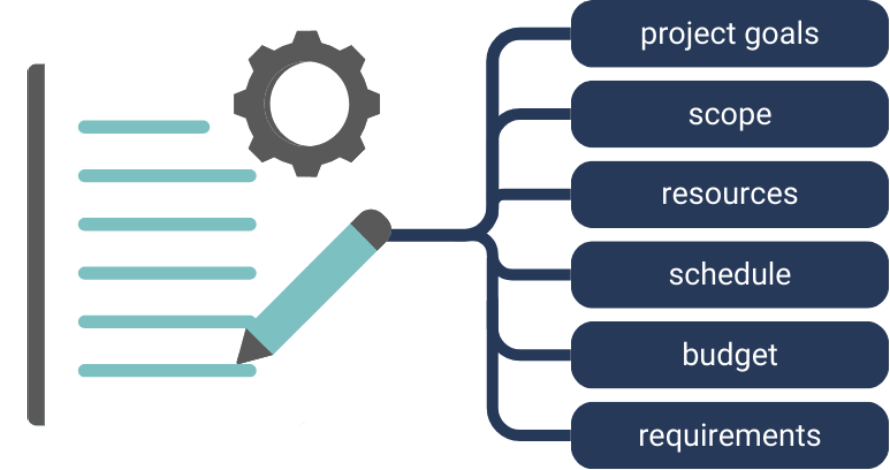
Creating a communication planWrike
Effective is a flexible project management software that is a great option for small teams with its solid free plan and balance of features between simplicity and more advanced functionality.communicationFeatures is vital for project success. A comprehensive plan should:Interactive Gantt charts
| Key ElementsCustom workflows and request forms | DescriptionTask and subtask management |
|---|---|
| StakeholdersFile sharing and team collaboration tools | Identify all parties involved in communicationBasic reporting features. |
| FrequencyPros | Determine how often updates will be sharedClean and intuitive user interface |
| ChannelsScalable from small teams to enterprise-level | Specify methods of communication (e.g., emails, meetings)Strong security features and measures in place. |
| ContentCons | Outline what information will be sharedLimited storage space in the free plan |
| ResponsibilitiesSome advanced features locked behind higher-tier plans | Assign roles for creating and disseminating informationSteeper learning curve for new users. |
Risk assessment and mitigation strategiesActiveCollab
Successful ActiveCollabrisk management is a project management software that is catered to freelancers and small teams that need basic project tracking functionality. The free plan offers many basic features useful for smaller projects. includes:Features
- Identifying potential risksTask management and team collaboration
- Determining their likelihood and impactTime tracking and workload management
- Developing mitigation strategies for the highest priority risksBasic invoicing capabilities
- Continuously monitoring and updating the risk assessments throughout the project.File sharing and storage
Change management planningEmail integration.
Change managementPros planning should include establishing a process for proposing and approving changes to the project scope, schedule, or budget, defining roles and responsibilities in the change management process, establishing criteria for evaluating the impact of proposed changes, and creating a system for documenting and communicating approved changes.Simple, no-frills, user interface
By carefully considering each of these aspects during the planning phase, project managers can set the stage for a successful project execution and delivery.Built-in time tracking and invoicing tools
3. Project executionGood for client-based projects.
This is the stage where planning turns into action. The work must be supervised and managed at this point in time.Cons
Implementing the project planLimited features in the free plan
Executing the Lacks more advanced reporting and analyticsproject planFree plan does not scale well for large teams. involves:Paid solutions for small to medium businesses
- Delegate tasks to team members based on their skills and availabilityMonday.com
- Ensure they have the resources they need to complete their tasksMonday.com
- Track progress against the schedule is a customisable work operating system that offers flexible workflows for any type of project. It is known for its bright, colorful, and easy-to-use interface.
- Multiple board views (Kanban, Gantt, timeline)
Managing team workflowsCustomisable templates and workflows
Efficient Automation and integration with other appsworkflow managementTime tracking and workload management is crucial for maintaining productivity. Consider the following strategies:Reporting and analytics.
- Set clear processes for handoffs between team membersPros
- Use Highly visual and intuitive interfaceAgile approachesScalable and adaptable for different team sizes and industries such as Strong automation and integration capabilities.ScrumCons or Kanban to manage projectsCan become expensive for larger teams
- Hold regular stand-up meetings to discuss progress and challengesSome users may find the interface too “busy” or colorful
- Encourage communication so that bottlenecks can be addressed quickly.Learning curve for more complex customisations.
Ensuring effective collaborationPricing
CollaborationPlans start at $8 per user per month (annual billing). is key to project success. To foster a collaborative environment:Smartsheet
| StrategySmartsheet | Description is a collaborative work platform that is designed to look and function like a spreadsheet. It is a popular choice for teams that are already familiar with spreadsheet software. |
|---|---|
| Clear rolesKey features | Define responsibilities for each team memberSpreadsheet-like interface with project management features |
| Open communicationGantt charts and critical path analysis | Encourage sharing of ideas and concernsResource management and capacity planning |
| Shared goalsAutomated workflows and approvals | Align team efforts towards common objectivesReporting and dashboards. |
| Conflict resolutionPros | Address disagreements promptly and constructivelyFamiliar interface for users already comfortable with spreadsheets |
Utilising project management toolsScalable for complex, enterprise-level projects
Project management toolsStrong data analysis and reporting capabilities. can be leveraged to improve execution efficiency. Task management software can be used to track progress and deadlines. Collaboration platforms can centralise communication and file sharing. Time-tracking tools can be implemented to monitor resource allocation and productivity. Reporting dashboards can be utilised to provide real-time project status updates.Cons
By effectively implementing these strategies during the execution phase, project managers can ensure smooth project progression and maintain team momentum towards achieving project goals.Steeper learning curve for users who are not familiar with spreadsheets
4. Project monitoring and controllingPricing
Monitoring and controlling involves keeping a check on all activities that are being executed to ensure that they are following the project plan.Plans start at $22.50 per user per month (annual billing).
Tracking progress against goalsZoho projects
Effective Zoho Projectsprogress tracking is a project management platform that is part of the larger Zoho suite of business tools. It is a cost-effective solution for small to medium-sized teams and offers a good balance of features and affordability. involves:Key features
- Regularly compare actual performance to planned objectivesGantt charts and critical path analysis
- Identify variances and their causesTime tracking and invoicing integration
- Take corrective action to address any deviations from the planIssue and bug tracking
- Update stakeholders on the project’s status and any major changes.Document management and collaboration
Establishing Critical Success Factors (CSF) and Key Performance Indicators (KPI)Integration with other Zoho apps.
CSFsPros and Competitive pricing for the features offeredKPIsStrong integration with other Zoho products are essential for measuring project success:User-friendly interface with customisable dashboards.
| MetricCons | DescriptionLimited third-party integrations compared to some competitors |
|---|---|
| CSFsSome advanced features only available in higher-tier plans | High-level goals that must be achieved for project successMay feel limited for large, complex projects. |
| KPIsPricing | Quantifiable measurements that indicate progress towards CSFsPlans start at $4 per user per month (annual billing) |
You can follow these best practices to implement effective progress tracking strategies; first, you must identify CSFs that are aligned with your project goals. Once you have identified CSFs develop KPIs for each CSF that can effectively track the progress towards them and periodically review and update your KPIs as the project progresses.Enterprise-level project management software
Managing budget and resourcesMicrosoft Project
To manage budget and resources effectively, it is important to track spending against budget, monitor resource allocation to ensure they are being used efficiently, identify potential resource bottlenecks or shortages early on and implement cost-saving measures where necessary.Microsoft Project
Adjusting plans as necessary is a robust project management software, built for use on large and complex projects. It’s a solid choice for organisations that are already entrenched in the Microsoft ecosystem.
Project plans may need to be adjusted to overcome unforeseen obstacles, to do this effectively, regularly review the project to identify areas that may need to be changed, evaluate the potential impact of proposed changes on the project scope, timeline and budget, communicate any changes to all relevant stakeholders and update project documentation to reflect approved changes.Key features
By carefully monitoring and controlling these aspects, project managers can ensure their projects stay on track and adapt to changes as needed.Advanced scheduling and resource management
5. Project closingPortfolio management capabilities
Project closing is the phase that formally completes the Comprehensive reporting and analyticsprojectIntegration with other Microsoft products and tools. It’s when you finalise project deliverables, review performance, and document learnings for future reference.On-premise and cloud-based deployment options.
Delivering final project outcomesPros
Final deliveryExtensive and robust features for complex project planning involves:Seamless integration with Microsoft 365 suite
- Validating that all project deliverables meet the agreed-upon specificationsHighly scalable, suitable for large enterprises.
- Seeking formal acceptance from stakeholdersCons
- Transferring project outputs to the relevant teams or clientsSteep learning curve for new users
- Closing any remaining contracts or agreements.Comparatively high cost versus other solutions
Conducting project review meetingsCan be overly complex for smaller, less intricate projects.
Project Pricingreview meetingsPricing starts at $10 per user per month (cloud-based version). allow you to assess how well the project has performed:Jira
- Convene all key stakeholders to review the project’s outcomesJira
- Assess the project’s success against the initial goals is an Atlassian-built project management tool that, while primarily targeted at software development teams, can be customised for a variety of other project types. It has a particular strength in supporting
- Identify areas of excellence and opportunities for improvementAgile methodologies
- Seek feedback from team members and stakeholders..
Documenting lessons learntKey features
Capturing Customisable lessons learntScrum is vital for organisational growth: and Kanban boards
| AspectAdvanced issue tracking and bug management features | DescriptionAgile reporting features and burndown charts |
|---|---|
| SuccessesA wide range of third-party integrations | Document effective strategies and practicesOn-premise and cloud-based deployment options. |
| ChallengesPros | Note obstacles encountered and how they were overcomeHigh degree of customisability for different workflows and teams |
| ImprovementsExceptional support for | Identify areas for enhancement in future projectsAgile methodologies |
Archiving project informationA large ecosystem of Atlassian products and third-party integrations.
Project archivingCons involves preserving valuable information after project completion. To effectively archive project information, organise all project documentation in a central repository, ensure easy accessibility for future reference, include key documents such as Configuration can be complex and time-consumingproject plansPrimarily oriented towards software development projects, reports, and communications and comply with organisational data retention policies.User interface can be cluttered and feel less intuitive for some users.
By carefully managing these closing activities, project managers can ensure a smooth project closure and contribute to ongoing organisational learning and improvement.Pricing
Best practices for effective project managementPricing starts at $7.50 per user per month (cloud-based version).
Incorporating effective project management best practices can greatly improve your project’s success. These strategies guide teams through common challenges and help them deliver successful results more consistently.Workzone
Embracing Agile methodologiesWorkzone
Following is an enterprise-grade project management software that provides a good balance of powerful features with a relatively accessible user interface. It’s built to be flexible and serves a variety of industries and project types.Agile methodologiesKey features can provide flexibility and adaptability:Interactive Gantt charts and task dependencies
- Implement iterative development cyclesCustomisable project templates
- Encourage regular stakeholder feedbackResource management and workload balancing features
- Prioritise tasks based on value and adapt plans accordinglyRobust reporting and analytics
- Foster a culture of collaboration and self-organisation within the team.Client access and approval workflows.
Utilising project management softwarePros
Project management toolsEasier to use than some enterprise alternatives can simplify processes and increase efficiency:Emphasis on team collaboration
| Tool TypeOffers comprehensive onboarding and customer support. | BenefitsCons |
|---|---|
| Task managementLess well-known compared to some other tools | Organise and track project tasks effectivelyMay not include some of the specialised features of industry-specific tools |
| Collaboration platformsPricing may be less competitive for smaller teams. | Facilitate communication and file sharingPricing |
| Resource allocationCustom pricing based on team size and needs. | Optimise team member workloadsNiche and specialised tools |
| Reporting dashboardsAirtable for customisable solutions | Provide real-time project status updatesAirtable |
Fostering clear communication is a flexible tool that blends the familiar spreadsheet interface with the power of a database, making it highly adaptable for
Strong communicationproject management is essential for project success: and beyond.
- Set up clear communication channels for the team and stakeholdersKey features
- Ensure frequent status updates and meetings to share informationCustomisable bases (think of them as databases) and views
- Be open to feedback and communication from team members and stakeholdersRich field types including attachments, images, and formulas
- Use different communication methods for different stakeholders.Wide range of templates for various use cases
Continuous learning and improvementAutomation and integration features
Regular learning and improvementAPI access for custom development. can enhance project management practices:Pros
- Review and analyse project results regularlyHighly flexible and customisable to suit unique needs
- Share and discuss findings and lessons learnt with the teamUser-friendly with an intuitive interface
- Stay informed about the latest trends and best practicesAdaptable for a variety of use cases beyond traditional project management.
- Seek out training and development opportunities to improve skills.Cons
These best practices provide a solid foundation for project managers to achieve project success. By focusing on effective communication and a commitment to learning, organisations can foster adaptability, efficiency, and continuous improvement in Can be time-consuming to set up for complex projectsproject deliveryMight feel overwhelming due to its flexibility and options.Some advanced features require higher-tier plans.
ConclusionPricing
Project managementFree plan available; paid plans start at $10 per user per month. is a vital discipline that plays a critical role in the successful execution of projects within organisations. By following a structured approach and adhering to best practices, project managers can ensure that their teams achieve organisational goals and Height for AI-powered project managementdeliverHeight
How often should I conduct project status meetings?
The frequency of project status meetings will vary depending on the complexity and duration of your project. Weekly meetings are the norm, but you can adjust as needed to find a balance between communication and productivity.What types of projects do you typically work on?
What are some common project management pitfalls to avoid?Which
Some common project management mistakes to avoid include inadequate stakeholder communication, poor risk management, setting unrealistic timelines or budgets, lack of clear objectives, and insufficient resource allocation.project management methodologies
To avoid these mistakes, it is important to carefully plan, monitor, and proactively solve problems throughout the project lifecycle. do you use (e.g.
InfographicAgile
