
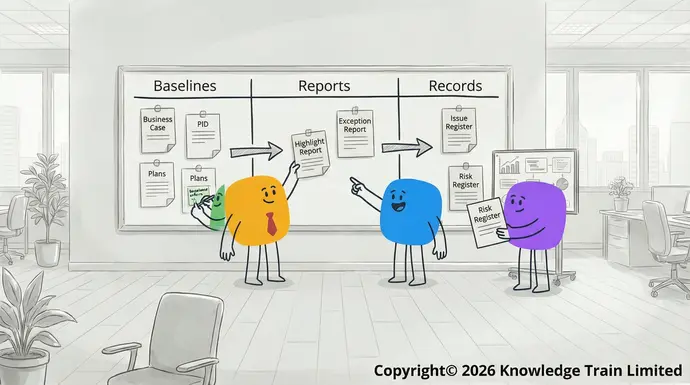
Functional help the project management team plan, manage, and control the project. They may be documents, presentations, spreadsheets, or some other output created by a software tool. They can take any form suitable for the needs of the project, such as paper, electronic, verbal, or even written on an ‘information radiator’ written on a whiteboard.
There are three types of management product in PRINCE2 . These are baselines, reports, and records.
Management products are created and maintained within the FunctionalPRINCE2 processes . The responsibilities for creating, maintaining, and approving them is described in the Always active PRINCE2 practices .
When preparing for your exams to get your PRINCE2 certification, be aware that for the PRINCE2 Foundation you must be able to recall the purpose of each management product. For PRINCE2 Practitioner , you must demonstrate how each of management product can be tailored to a specific scenario.The technical storage or access is strictly necessary for the legitimate purpose of enabling the use of a specific service explicitly requested by the subscriber or user, or for the sole purpose of carrying out the transmission of a communication over an electronic communications network.
In the PRINCE2 manual , the management products are listed in detail in Appendix A. For a full set of templates for the management products, these can be downloaded from the PRINCE2 templates page.Preferences
Baseline management products
Baseline management products are those that define aspects of the project and once they have been approved, are subject to change control. Usually, baseline products have a version number assigned to them to identify the baseline.
Most baseline management products evolve during pre-project and during the initiation stage. The baseline management products of PRINCE2 are described below. Many of these form part of the project initiation documentation (PID) which is also indicated below.The technical storage or access that is used exclusively for statistical purposes.
- Benefits management approach
- Business caseThe technical storage or access that is used exclusively for anonymous statistical purposes. Without a subpoena, voluntary compliance on the part of your Internet Service Provider, or additional records from a third party, information stored or retrieved for this purpose alone cannot usually be used to identify you.
- Change management approach
- Communication management approach
- Commercial management approach
- Digital and data management approach
- Issue management approach
- Plan (project, stage, team, exception)Marketing
- Product description
- Project brief
- Project initiation documentation
- Project product descriptionMarketing
- Quality management aproach
- Risk management approach
- Sustainability management approach
- Work package description
Benefits management approach (part of PID)
The purpose of the benefits management approach is to identify the benefits management actions and reviews that will be performed to ensure the outcomes of the project will be achieved, and to confirm that the benefits are realized.The technical storage or access is required to create user profiles to send advertising, or to track the user on a website or across several websites for similar marketing purposes.
Business case
A Manage optionsbusiness caseManage services contains all the information needed for the business to decide whether the proposed project is desirable, viable, and achievable.Manage {vendor_count} vendors
A Read more about these purposesbusiness case serves as the continual rationale for the project, and its validity must persist throughout the entire Acceptproject life cycle . Typically, the outline business case is developed by the executive, and then is refined in more detail by the project manager during the project’s initiation phase, who then maintains it throughout the project’s duration.Deny
Change management approach (part of PID)
A View preferenceschange management approach serves as a blueprint for the target organizational state required for the project to meet its objectives and describes how the business will move from the current state to the future state.Save preferences
Communication management approach (part of PID)
The View preferencescommunication management approach{title} describes the communications with stakeholders, both inside and outside the project, throughout its duration. The approach fosters stakeholder engagement by orchestrating a structured and two-way exchange of information.{title}
Commercial management approach (part of PID){title}
A Manage Consentcommercial management approach describes any processes, standards, and techniques to be used, and the responsibilities for commercial management, including things such as procurement and contract management.To provide the best experiences, we use technologies like cookies to store and/or access device information. Consenting to these technologies will allow us to process data such as browsing behavior or unique IDs on this site. Not consenting or withdrawing consent, may adversely affect certain features and functions.
Digital and data management approach (part of PID)
A digital and data management approach describes how data will be managed across the project, and after the project closes.
Issue management approach (part of PID)Functional
An issue management approach describes the processes for managing issues, and how changes to the project baseline will be controlled.
Plan (project plan, stage plans, team plans, exception plans)
A Functionalplan provides an overview of the objectives, how they will be achieved, when they will be completed, and with what resources. A plan outlines the scope of the work, the products to be delivered, and the activities and resources responsible. Always active PRINCE2 recommends three levels of plan – project plan, stage plan(s), and team plan(s).
Preferences
The project brief is a short summary of the project and is used by the project board to authorize the initiation stage of the project. It is assembled during the starting up a project process by the project managerPreferences. The project brief is then used in the initiating a project process as the basis for creating the project initiation documentation.
If you are familiar with the PMBOK ® Guide, the Project Charter serves a similar purpose as the project brief .The technical storage or access is necessary for the legitimate purpose of storing preferences that are not requested by the subscriber or user.
Project initiation documentation
The
Reports
Reports form snapshots of progress containing information about the status of the project at a point in time. There are seven reports recommended by PRINCE2, but depending upon how the method is tailored, fewer may be used on a project. The recommended reports are described below.
- Checkpoint report
- End project report
- End stage report
- Exception report
- Highlight report
- Issue report
- Lessons report
Checkpoint report
A checkpoint report is written by a team manager to report the progress of a work package to the project manager. It summarises the progress compared to what was agreed in the work package description. The format and frequency of checkpoint reports are agreed when the team manager accepts a work package from the project manager.
The checkpoint report is used by the project manager to update the progress within the current stage plan.
End project report
The end project report is created during the closing a project process by the project manager. The project board uses it to evaluate the project before authorizing its closure. It summarizes project performance by comparing it to the targets in the baseline project initiation documentation.
It also confirms the products have been accepted by, and delivered to, the users and summarizes any lessons learned during the project.
End stage report
Every time a management stage (except the final stage) reaches its end, the project manager creates an end stage report. This compares the performance of the current stage against the targets in the original stage plan. It summarizes current issues and risks, any benefits realized so far, and contains a forecast for the next stage.
The end stage report (and the next stage plan) contains all the information the project board needs to decide whether to continue or close the project.
Exception report
The project manager creates an exception report when requested by the project board in a situation when a stage plan or project plan is forecast to exceed its tolerances. The report provides options for resolving the exception and recommends the best way to proceed. The information it contains is used by the project board to decide its next steps.
Highlight report
A highlight report is written by the project manager at a regular interval during a stage. It contains a summary of the stage progress. The report summarises progress during the period it is reporting and gives early warning of any issues which might cause exceptions in the future.
The highlight report enables the project board to ‘manage by exception’ between each stage end.
Issue report
For every issue in the issue register, an issue report is created by the project manager to describe in detail the issue.
An issue report contains information to uniquely identify the issue, its type, the date raised, the person who raised it, the impact assessment on the project targets, the actions to resolve it, the person(s) responsible for these actions, and the closure date.
Lessons report
A lessons report documents any lessons that might be of value later in the current project, or to future projects. It is created by the project manager either at the end of a stage, and/or at the end of the project.
The purpose of a lessons report is to initiate actions to enable the organization (or project) to avoid any negative lessons in the future and to embed any good lessons within the organization’s or project’s ways of working.
Records
Records are dynamic management products used to maintain regular status information about the project. Records do not need to be kept under version control because they are continuously updated to reflect project progress.
Collectively, these are referred to as the project log and contain the items listed below.
Project log
The project log is used to record all the continuously changing information about issues, lessons, products, quality, and risks, and any other informal actions or events. Because it is dynamic it contains both the current and historic record of project progress.
Daily log (part of project log)
The daily log is used by the project manager to record notes, any informal issues, notes, and information not captured in the other management products.
Team managers may also have their own daily log to record information about their work package.
Issue register (part of project log)
An issue register is used to capture and manage formal issues. An issue register contains information such as unique issue identifier, type of issue, date raised, raised by, description, status, and closure date.
Lessons log (part of project log)
The lessons log records all useful experiences (both the good and the bad) that might be useful later in this project, or to other projects. Information from the lessons log is incorporated into lessons reports.
Product register (part of project log)
The product register is a list of the products required for a plan and their status.
Quality register (part of project log)
The quality register records all the quality activities during the project that have been planned or completed. A quality register contains information such as unique identifier for the quality activity, product identifier, quality method, activity dates, responsibilities, the activity results, and any further records associated with the activity.
Risk register (part of project log)
The risk register captures and maintains information about all the project’s risks. It contains information such as unique identifier for the risk, description, probability, impact, proximity, velocity, risk response(s), risk owner, risk action owner, and relevant dates.