
- Successful rollout depends on clear milestones, configured workflows, and practical team training.
- Timely identification of potential issues
- Accurate progress reporting.
Top 10 project tracker tools and templates+44 (0)207 148 5985
1. Monday.comOr chat with us using the link at the bottom of the screen.
Monday.com provides an easy-to-use work management platform that can be used to track project progress and facilitate collaboration among team members. It is designed for teams of all sizes and offers a flexible and customisable interface and workflows.Contact us with questions about the courses on this page, or about which project management certification or training is best for you.
Key featuresFinance FAQs
- Multiple project views including Gantt, Kanban, and TimelineContact
- Resource management and time trackingCookies
- Automations and integrations with other toolsPrivacy
- Mobile app for on-the-go access.
2.
Knowledge Train Ltd is an Introducer Appointed Representative of NewDay Cards Ltd for the Newpay finance product provided by NewDay Ltd. NewDay Cards Ltd acts as a credit broker, not a lender. We will introduce you exclusively to Newpay finance products provided by NewDay Limited under this Introducer Appointed Representative arrangement. Finance available from other lenders is not covered by this arrangement. NewDay Ltd and Newday Cards Ltd are authorised and regulated by the Financial Conduct Authority (ref nos 690292 and 682417 respectively).project management software that provides teams with a visual way to plan, organise, and track work. It offers a user-friendly interface, flexible features, and integrations with many other apps.
Key features
- Task dependencies and milestones
- Team collaboration tools
- Integration with popular apps
- Customisable dashboards and reporting.Search
7. Trello
Card-based Trello is a visual project management tool that allows users to track the progress of their projects. It is well suited for smaller teams or individual use.
Key features
- Kanban-style boards
- Simple drag-and-drop interface
- Power-Ups to extend functionality
- Mobile app available for iOS and Android.
8. Microsoft Project
Microsoft Project is a software application that is widely used for managing complex projects. It is known for its powerful features and comprehensive functionality.
Key features
- Advanced scheduling and resource managementManage Consent
- Integrates with other Microsoft products
- Comprehensive reporting and analyticsTo provide the best experiences, we use technologies like cookies to store and/or access device information. Consenting to these technologies will allow us to process data such as browsing behavior or unique IDs on this site. Not consenting or withdrawing consent, may adversely affect certain features and functions.
- Ideal for large-scale and enterprise projects.
9. Jira
Originally developed for software development teams, Jira has become a popular project management tool for various industries and project types.
Key featuresFunctional
- Agile project management capabilities
- Customisable workflows and issue tracking
- Vast integration ecosystem
- Advanced search and filtering.
10. FunctionalNotion
Notion is a versatile workspace that combines note-taking, databases, and project management functionalities. Always active
Key features
- Extremely flexible and customisable workspace
- All-in-one platform for multiple tools
- Collaboration through editing and sharing
- Variety of templates for different project needs.
How to choose the right project tracker
Criteria for selecting a project tracker:The technical storage or access is strictly necessary for the legitimate purpose of enabling the use of a specific service explicitly requested by the subscriber or user, or for the sole purpose of carrying out the transmission of a communication over an electronic communications network.
- Size and composition of the project team
- Type, complexity and expected duration of the project
- Financial resources available to the project
- Desired features and capabilities (e.g. time tracking, resource allocation, task management)
- Integrations with other tools and systemsPreferences
- User-friendliness and training requirements.
Implementing your project trackerStatistics
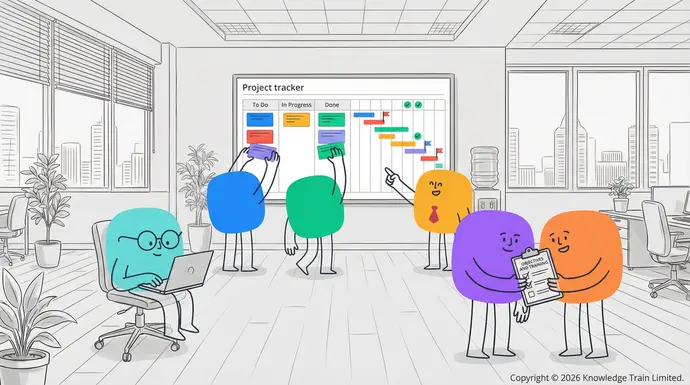
After selecting a project tracker, follow these five steps to implement it successfully:
- Define clear objectives and milestones for your project
- Set up your project structure and workflows within the tracker
- Train your team members on how to use the tool effectively
- Regularly update and maintain your project tracker with accurate data
- Review and adjust your processes as needed to optimise productivity and efficiency.
Conclusion
Choosing and implementing the right project tracker can make a significant difference in your team’s productivity. Whether you opt for a robust software solution or a simple template, select a tool that aligns with your unique needs and use it consistently throughout your The technical storage or access that is used exclusively for statistical purposes.projects for best results.The technical storage or access that is used exclusively for anonymous statistical purposes. Without a subpoena, voluntary compliance on the part of your Internet Service Provider, or additional records from a third party, information stored or retrieved for this purpose alone cannot usually be used to identify you.
FAQs
How often should I update my project tracker?
You should update your project tracker daily or weekly, depending on the speed and complexity of your project.
Can I use multiple project trackers for different aspects of my project?
Although it is technically possible, it is better to use one detailed project tracker for all aspects of your project. This will help to prevent inconsistencies between different trackers.
Are free project trackers as effective as paid ones?Marketing
Free project trackers can be effective for smaller and simpler projects. Paid project trackers usually have more features and are better for more complex projects.
How can I encourage my team to use the project tracker consistently?
Set an example and provide training. Show your team the benefits of using the tracker. Make it a regular part of your team’s workflow and meetings.
Can project trackers help with remote team management?Marketing
Yes, many project trackers have features that can help with managing a remote team. These features include real-time updates and communication tools.