
Key takeaways
A strong schedule turns a plan into a workable timeline that can be managed and improved.
- A project schedule focuses on timing, sequencing, and deadlines, while the project plan also covers scope, budget, and resources.
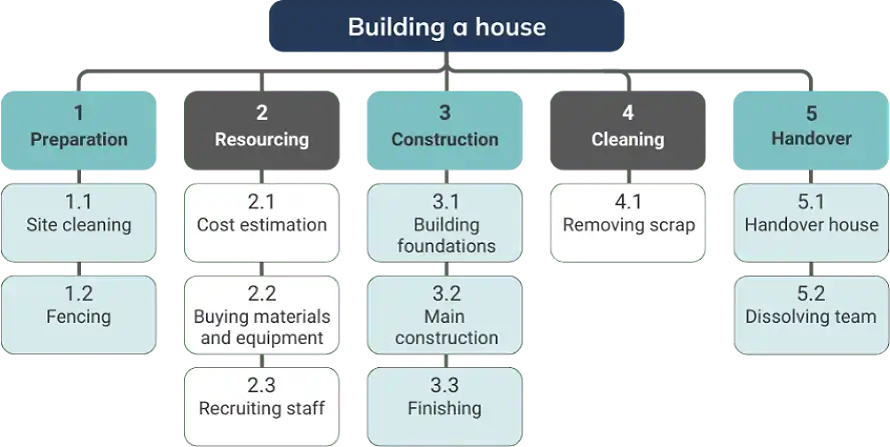
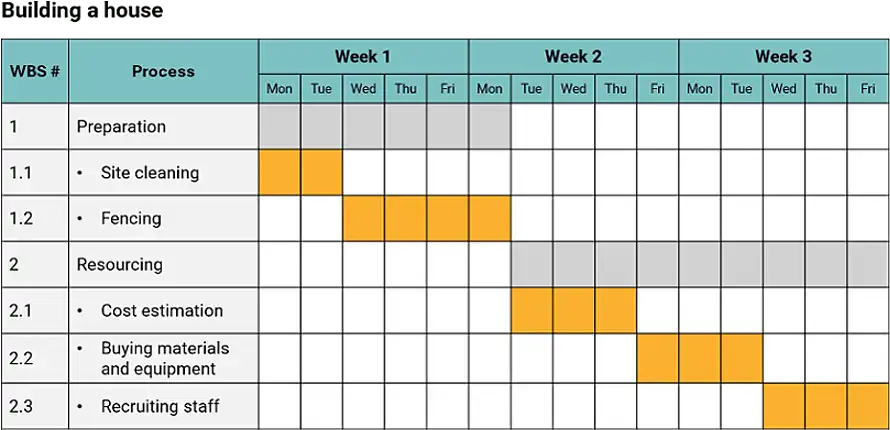
- Use a Work Breakdown Structure to define tasks, group them into work packages, and set clear milestones.Copied!
- Sequence work using dependencies and estimates, then assign resources realistically based on availability and skills.Key takeaways
- Validate the schedule with stakeholders, communicate it widely, and monitor progress with regular updates.A structured lessons learned cycle turns project experience into repeatable improvements.
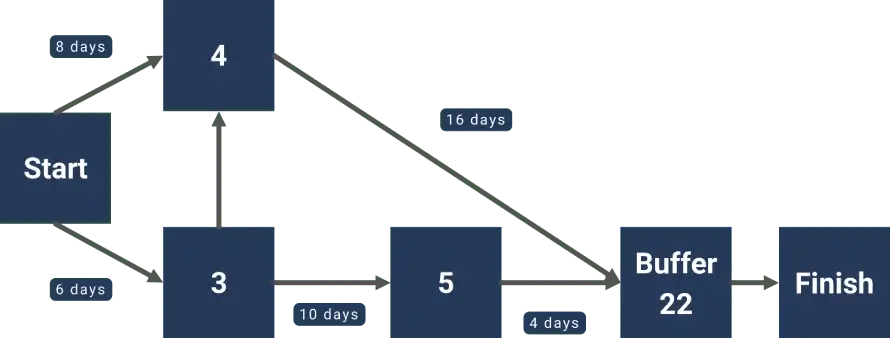
- Choose fit-for-purpose tools, and use CPM or CCPM to manage critical paths, constraints, and buffers in complex projects.Capture lessons in real time, at phase ends, and at project close to avoid losing detail.


- Other popular optionsproject management tools: Trello, Asana, Basecamp, etc. All these offer various levels of functionality and can accommodate a range of project sizes.. Use a consistent structure and categorisation system, so the lessons are well-organised. Plan for the repository to be scalable so you can add new projects and insights over time.
Key features to look for in scheduling softwareImplementing effective search and retrieval systems
When it comes to choosing a scheduling software, there are some key features that you should ensure it has. Here are some of the most critical ones:Make sure that lessons are easily discoverable. This can be done by implementing a good search function with filters based on project type, date, and category. Use a tagging system to identify key themes and topics, which will allow users to find relevant information quickly. You can also add an option for users to rate the usefulness of a lesson to help surface the most valuable insights. These features will help increase the accessibility and usefulness of the stored knowledge.
- Gantt chart creation and customisationEnsuring accessibility and usability of stored lessons
- Resource managementEncourage everyone to use the lessons learned repository by making it accessible and easy to use. This includes creating user-friendly interfaces on both desktop and mobile platforms. Role-based access control can help protect sensitive information while still providing appropriate access. Regularly curate the content to keep it up-to-date and valuable. Conduct training sessions on how to use the repository so that everyone can get the most out of this resource.
- Task dependenciesCreating a well-organised, easily searchable, and accessible repository will ensure your organisation can effectively leverage past experiences. This will turn lessons learned from being static records into resources that actively improve decision-making and project outcomes across your organisation.
- Real-time collaborationLeveraging lessons learned for future projects
- Integration with other business toolsThe real power of lessons learned lies in how they are applied to future projects. In this part, we’ll explore strategies and techniques for leveraging lessons learned effectively to improve project outcomes and drive organisational success.
- Reporting and analytics.Incorporating lessons learned into project planning
If you can find a tool that covers all these bases, you’ll be well on your way to more streamlined and effective project scheduling.Incorporating lessons learned into your