Key takeaways
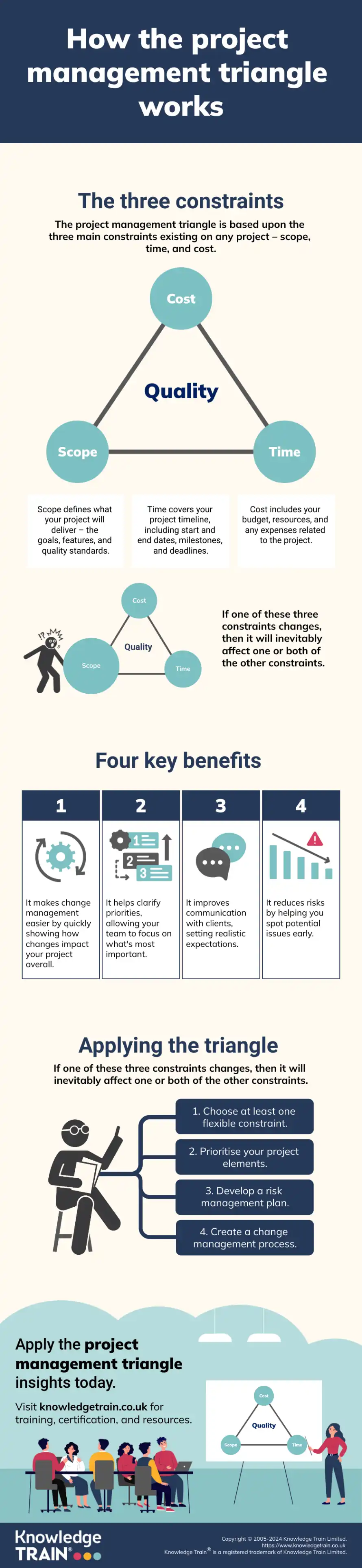
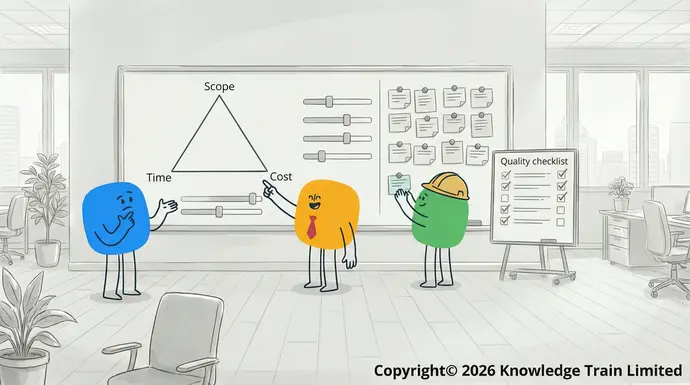
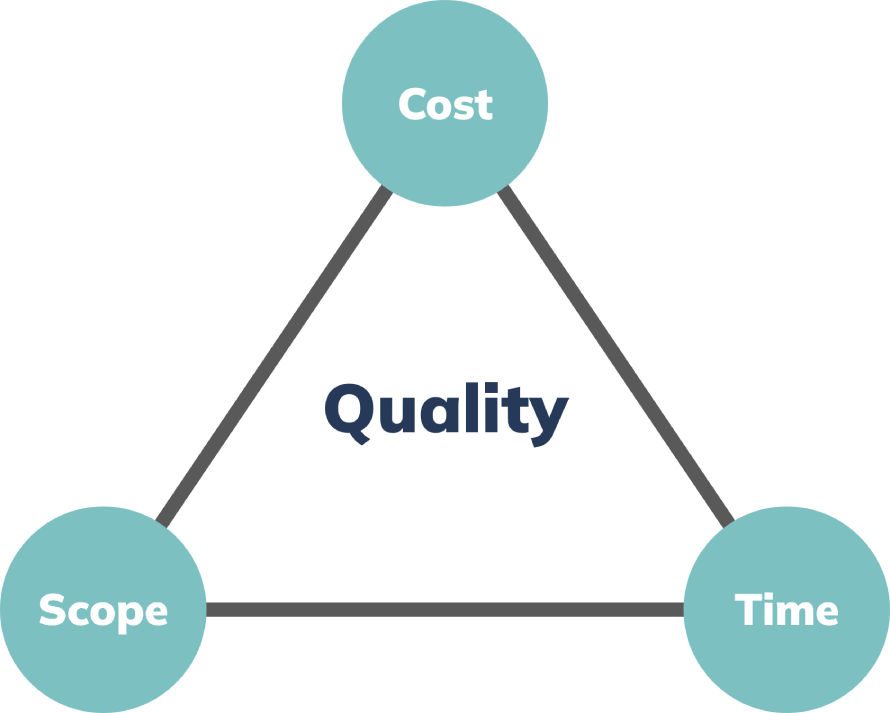
Scope, time and cost move together, so every change needs a conscious trade-off.
Disadvantages: Dependence on internet connectivity, potential security and privacy concerns.
Risk reductionOn-premise solutions
Utilising the triangle will help in Installed and maintained on local servers within an organisation’s own infrastructure.managing risksAdvantages: Greater control over data security and customisation, offline access and usage, compliance with specific industry requirements.. This is possible because this will help the team to predict potential problems earlier in the process, have a contingency plan, and balance the risks in all three constraints.Disadvantages: Higher upfront costs, in-house IT support and maintenance required, limited scalability.
The use of the project management triangle allows for Industry-specific vs general-purpose toolsmanagersProject management software can also be categorised based on its intended target audience and industry: to make decisions in a balanced manner. As such, it becomes possible to deal with complex projects with great ease.Industry-specific tools:
When managing project quality, you can try these tips: Scalable from small teams to enterprise-level
- Quality standards Strong security features and measures in place.: Define specific, measurable quality criteria for the project deliverables. Cons
- Continuous testing Limited storage space in the free plan: Implement regular quality checks throughout the project lifecycle. Some advanced features locked behind higher-tier plans
- Peer review Steeper learning curve for new users.: Leverage the expertise of team members to identify and address quality issues. ActiveCollab
- Customer feedback ActiveCollab: Regularly collect and incorporate stakeholder feedback on project deliverables. is a project management software that is catered to freelancers and small teams that need basic project tracking functionality. The free plan offers many basic features useful for smaller projects.
Through the implementation of these methods, project managers can successfully navigate and mitigate trade-offs between the competing constraints of scope, time, cost, and quality. However, it is important to note that constraint management is an iterative process that necessitates continuous monitoring and adjustment in response to changing project dynamics.Features
Tools for managing the project management triangleTask management and team collaboration
Software can help you keep track of the project management triangle and ensure your project management is top-notch. Here are some of the best project management software to consider:Time tracking and workload management
Project management software optionsBasic invoicing capabilities
- Monday.comFile sharing and storage : A flexible platform suitable for multiple project types and management styles. With Visual boards for easy task tracking and prioritisation, it’s one of the best software for project management, and it also has customisable workflows for specific project requirements.Email integration.
- ClickUpPros : A feature-rich tool with robust Agile project support and time tracking and resource management features. ClickUp also provides multiple view options (list, board, Gantt, calendar) to cater to different preferences and project needs.Simple, no-frills, user interface
- TeamworkBuilt-in time tracking and invoicing tools
- Jira
- Jira
- is an Atlassian-built project management tool that, while primarily targeted at software development teams, can be customised for a variety of other project types. It has a particular strength in supporting
- Agile methodologies
.
Key features
Customisable
Scrum
and Kanban boardsAdvanced issue tracking and bug management featuresAgile reporting features and burndown charts
A wide range of third-party integrations
On-premise and cloud-based deployment options.Pros
High degree of customisability for different workflows and teams
Exceptional support for Agile methodologiesA large ecosystem of Atlassian products and third-party integrations.
Cons
Configuration can be complex and time-consumingPrimarily oriented towards software development projects
PricingPricing starts at $7.50 per user per month (cloud-based version).Workzone
Workzone is an enterprise-grade project management software that provides a good balance of powerful features with a relatively accessible user interface. It’s built to be flexible and serves a variety of industries and project types.Key featuresInteractive Gantt charts and task dependencies
Customisable project templatesResource management and workload balancing features
Robust reporting and analytics
Rich field types including attachments, images, and formulas
Wide range of templates for various use cases Automation and integration features API access for custom development. Pros Highly flexible and customisable to suit unique needs User-friendly with an intuitive interface Adaptable for a variety of use cases beyond traditional project management.
We hope that our blog post on the project management triangle has provided you with a clear and concise understanding of the concept. Remember, project management is not just about executing tasks but also involves communication with stakeholders, ongoing monitoring and adjustment of project parameters, team collaboration, and accountability, and continuous process improvement. Balancing these constraints is critical for project success, regardless of the industry or project type. As the case studies have shown, the effective application of the project management triangle can lead to exceptional outcomes. Cons
We encourage you to apply these principles to your projects and experience the benefits of successful project management. With the right mindset, tools, and techniques, you will be able to navigate through challenges, meet stakeholder expectations, and consistently deliver successful outcomes. Embrace the project management triangle as an invaluable part of your project management toolkit. Can be time-consuming to set up for complex projects
FAQs Might feel overwhelming due to its flexibility and options
What is the iron triangle in project management? Some advanced features require higher-tier plans.
The iron triangle is another name for the project management triangle, emphasising the importance of balancing scope, time, and cost. Pricing
How does changing one constraint affect the others in the project management triangle? Free plan available; paid plans start at $10 per user per month.
Changing one constraint typically impacts the other two, requiring adjustments to maintain balance and quality. Height for AI-powered project management
Can the project management triangle be applied to all types of projects? Height
Yes, the project management triangle is a versatile concept that can be applied to various industries and projects. is a new project management app that uses AI to help you boost your productivity and manage your workflow.
What are some signs that a project’s constraints are out of balance? Features
Signs of imbalance may include frequent scope changes, missed deadlines, budget overruns or quality issues. Create and manage tasks with the help of AI
How often should project managers review and adjust the project management triangle? View your tasks in a list, on a board, or in a calendar
Regular reviews are crucial, especially at significant milestones or when major changes occur. Communicate with team members in built-in chat
What role does innovation play in managing the project management triangle? Design your own workflows and automations
Innovation can help optimise processes, potentially improving all constraints simultaneously. Integrates with popular tools such as Slack, GitHub, etc.
Infographic Pros