
Key takeaways
A strong schedule turns a plan into a workable timeline that can be managed and improved.Knowledge Train
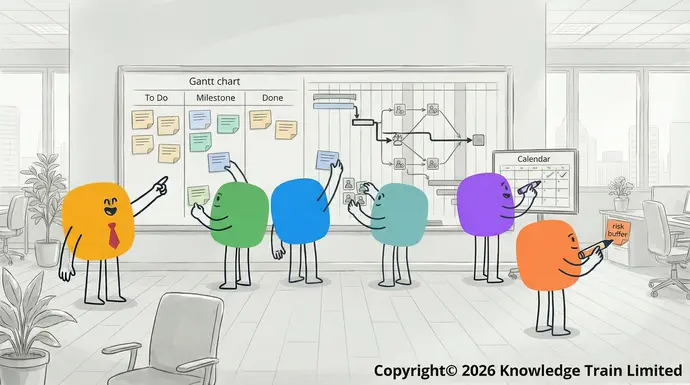
Understanding project scheduling
What is a project schedule?
A project schedule is a detailed document that outlines the timeline of tasks and milestones that must be completed to accomplish the project. It acts as a roadmap for project execution and monitoring.
Components of a project schedule
- Tasks and activitiesWaterfall method
- Duration and deadlines
- Resource allocationKnowledge Train
- Dependencies and constraints19 Feb 2026
- Milestones and deliverables.
Difference between project schedule and project planLearn about the linear and sequential approach to software development and project management called the waterfall method. The article will detail the steps, pros, and cons of this method.
A project plan is a more comprehensive document that encompasses the schedule, as well as other project aspects such as scope, budget, and resources. The project schedule, on the other hand, focuses on the time aspect, including task sequencing and deadlines.
Benefits of using a project schedule
- Provides clarity and direction : A project schedule offers a clear path for project execution, ensuring that all team members are aware of their responsibilities and deadlines.Project controls – your driver to project success
- Improves time management : A schedule helps to prioritise tasks and allocate time efficiently, reducing the risk of missing deadlines.Knowledge Train
- Allows efficient resource allocation19 Feb 2026: A project schedule enables the optimal distribution of personnel, equipment, and materials across project tasks.
:
- Optimistic estimate
- Most likely estimate
- Pessimistic estimate.
4. Assign resources
Identify the resources needed for each task, then assign them to the relevant tasks. Be sure to consider team members’ skills and experience, availability and current workloads.
5. Finalise the scheduleGive us a call
Confirm the draft schedule with the stakeholders and finalise it. Be sure that the schedule is realistic and it meets the project’s objectives and constraints and use the scheduling software to create a Gantt chart (or another visual representation).+44 (0)207 148 5985
6. Share and monitor progress
Share the finalised schedule with the team members and stakeholders and track and report on the progress. Consider using Or chat with us using the link at the bottom of the screen.project management softwareContact us with questions about the courses on this page, or about which project management certification or training is best for you. for real-time updates and collaboration.Finance FAQs
- Set up regular progress meetingsContact
- Encourage team members to report the task completions as soon as they are done
Project scheduling techniques, ITIL
There are several techniques available for the effective creation and management of project schedules. Some of these techniques include Gantt charts, task lists, and calendars. This knowledge train will cover the definition and purpose of each of these techniques, the advantages and limitations of using each, when it is appropriate to use each, and benefits for smaller projects. The knowledge train aims to provide a comprehensive understanding of project scheduling techniques to help project managers make informed decisions about which techniques to use for their projects.®
Gantt charts, P3O
Definition and purpose®
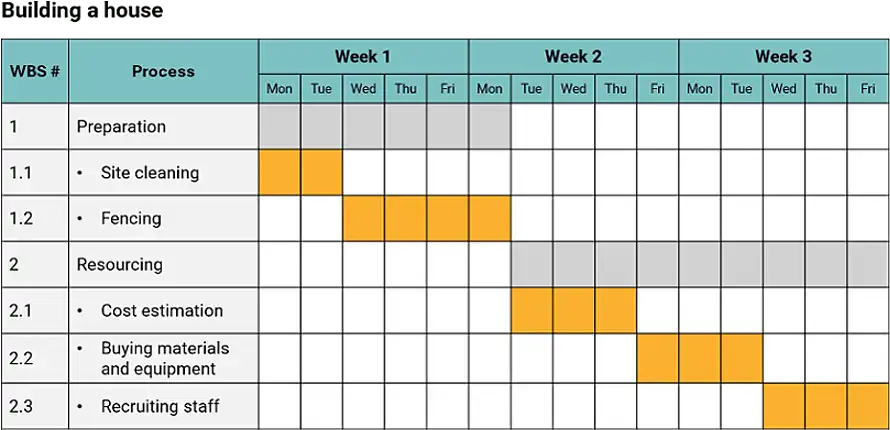
A , PRINCE2Gantt chart® is a type of bar chart that is commonly used in project management to visually represent a project schedule. It shows the start and end dates of project tasks, as well as their duration, as horizontal bars along a timeline. Gantt charts can also be used to display the dependencies between tasks. Agile, RESILIA
Advantages and limitations®
Advantages, and the Swirl logo are registered trademarks of the PeopleCert group. Used under licence from PeopleCert. All rights reserved. AgilePM
- Provides a visual representation of task dependencies®
- Simplifies the identification of the critical path and AgileBA
- Capable of showing progress against the planned schedule.®
Limitations are registered trademarks of Agile Business Consortium Limited. All rights reserved. The APMG International AgilePM and Swirl Device logo, APMG International AgileBA and Swirl Device Logo, APMG International Change Management and APMG International Better Business Cases and Swirl Device logo are trademarks of The APM Group Limited, used under permission of The APM Group Limited. All rights reserved. Better Business Cases™ is a trademark of Her Majesty’s Treasury. All rights reserved. DevOps Foundation
- Can become cluttered and difficult to read for larger projects with many tasks®
- Can be time-consuming to create and maintain is a registered mark of the DevOps Institute. “PMI”, “PMBOK
- Limited ability to show detailed task dependencies and resource allocation.®
Task lists Guide”, “PMP” and “CAPM” are registered marks of Project Management Institute, Inc. Knowledge Train Scrum Essentials™, Business Learning Library (BLL)™, Business Analysis Learning Library (BALL)™, Agile Learning Library (ALL)™, IT Learning Library (ITLL)™, and Compliance Learning Library (CLL)™ are trademarks of Knowledge Train Limited. All rights reserved.
When to use task listsKnowledge Train Ltd is an Introducer Appointed Representative of NewDay Cards Ltd for the Newpay finance product provided by NewDay Ltd. NewDay Cards Ltd acts as a credit broker, not a lender. We will introduce you exclusively to Newpay finance products provided by NewDay Limited under this Introducer Appointed Representative arrangement. Finance available from other lenders is not covered by this arrangement. NewDay Ltd and Newday Cards Ltd are authorised and regulated by the Financial Conduct Authority (ref nos 690292 and 682417 respectively).
Task lists are often used in project management as a basic tool for organising and tracking project activities. They can be useful in the early stages of a project, or as a supplement to more advanced scheduling techniques. Task lists are appropriate to use when the project is relatively simple, and the team members are familiar with the tasks.
Benefits for small projects
- Simple to develop and maintain
- Facilitate clear communication of responsibilities
- Allow quick changes and revisions.
CalendarsSearch
Uses in project scheduling
Calendars are often used in project management to help visualise and plan the timeline of a project. They can be used to track important project dates, such as milestones, deadlines, and deliverables. Calendars can also be used to provide an overall view of the project’s timeline.
Limitations of calendar-based scheduling
- Inadequate representation of task dependencies
- May lack necessary detail for more intricate projects
- Challenges in depicting tasks with varying durations.
Project scheduling techniques are an essential aspect of project management and choosing the right technique can greatly impact the success of a project. By understanding the advantages and limitations of each technique, as well as when and where to use them, project managers can effectively create and manage project schedules. Combining multiple techniques, such as using a Gantt chart to track progress and a calendar to visualise the timeline, can also be a useful strategy for managing project schedules.
Advanced scheduling conceptsRequest a quote
The more complex the project , the more benefit can be gained from advanced scheduling techniques. CPM and CCPM are methods to take your project planning to the next level.
Critical Path Method (CPM)
Definition and importance
The Critical Path Method (CPM) is a project management technique used to identify the longest path of dependent tasks in a project schedule. The critical path determines the minimum project duration.Manage Consent
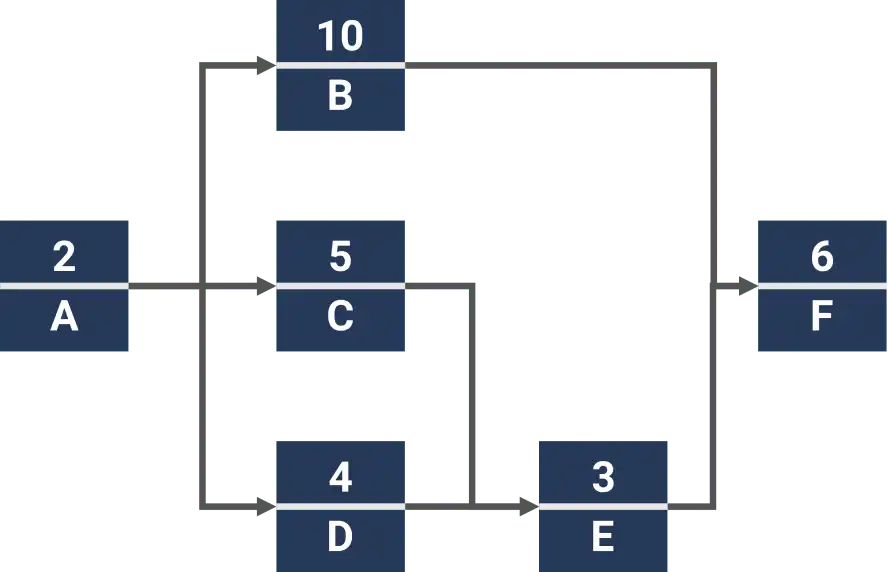
- Estimate the duration of each task
- Calculate the earliest start and finish times for each taskFunctional
- Determine the latest start and finish times without delaying the project
- Identify tasks with zero float (slack time).
Critical Chain Project Management (CCPM)
Resource-based approach
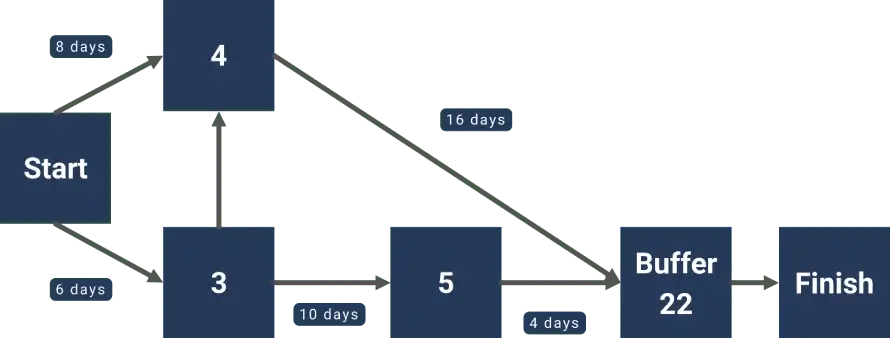
Critical Chain Project Management (CCPM) is a method that focuses on resource-based scheduling. It considers both task dependencies and resource constraints to optimise project schedules.Functional
Differences from Critical Path Method
- CCPM considers resource constraints, while CPM focuses solely on task dependencies Always active
- CCPM uses buffer time at the project level, rather than padding individual tasks
- CCPM aims to reduce multitasking and encourage early task completion.
Both methods can provide useful insights for optimising project schedules and enhancing overall project management efficiency.
Tools for project scheduling
If you’re going to be doing project scheduling on a regular basis, you might find it useful to consider using specialist software to help you with this. A quick search online will pull up a range of tools. Some popular options include:
Project management software options
- JiraThe technical storage or access is strictly necessary for the legitimate purpose of enabling the use of a specific service explicitly requested by the subscriber or user, or for the sole purpose of carrying out the transmission of a communication over an electronic communications network.: Agile project management software with customisable workflows and reporting.
- Microsoft Project : Software for creating detailed project schedules and resource management.Preferences
- Other popular options : Trello, Asana, Basecamp, etc. All these offer various levels of functionality and can accommodate a range of project sizes.
Key features to look for in scheduling software
When it comes to choosing a scheduling software, there are some key features that you should ensure it has. Here are some of the most critical ones:Preferences
- Gantt chart creation and customisation
- Resource management
- Task dependencies
- Real-time collaboration
- Integration with other business tools
- Reporting and analytics.
If you can find a tool that covers all these bases, you’ll be well on your way to more streamlined and effective project scheduling.
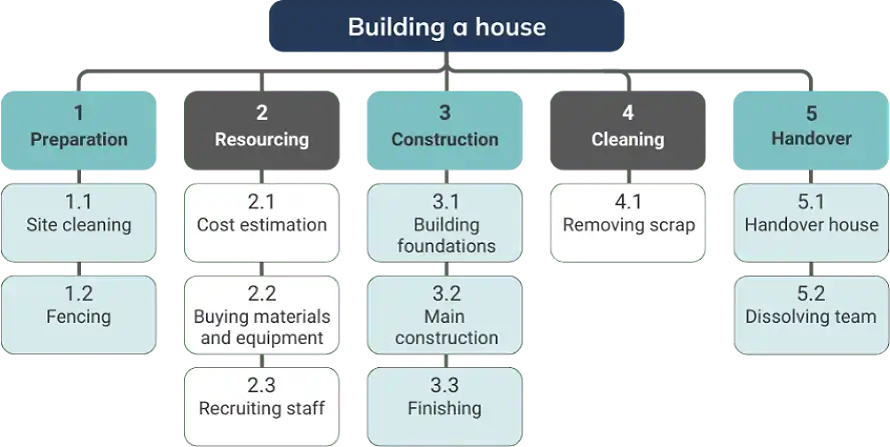
(WBS), makes it easier to estimate the time, track progress, and allocate resources.
Consider dependencies and constraints
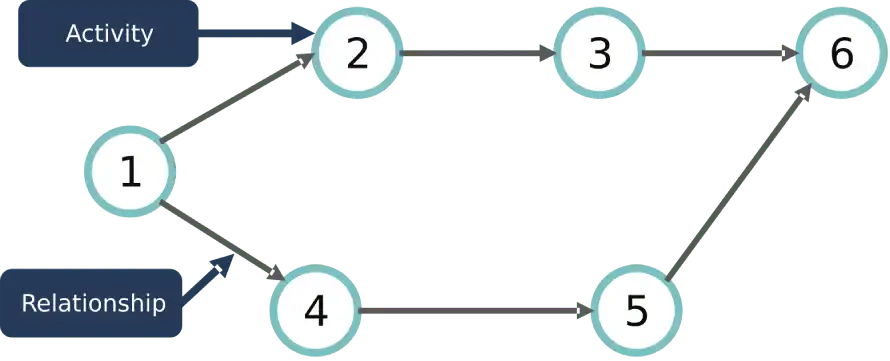
Identify and document all task dependencies and project constraints. This will help you to avoid scheduling conflicts and ensure that activities are logically sequenced.
Build in buffer time for unexpected delays
Include buffer time in your schedule to account for potential delays and unforeseen events. This will give you more flexibility in your schedule and help to avoid missed deadlines.
Regularly update and communicate schedule changesThe technical storage or access is required to create user profiles to send advertising, or to track the user on a website or across several websites for similar marketing purposes.
Update your schedule regularly and communicate any changes to stakeholders. Schedule reviewsManage options are a critical part of the overall scheduling process and can help you to identify potential problems early on.Manage services
Following these best practices will help you to create better project schedules and ultimately lead to better project outcomes.Manage {vendor_count} vendors
Common challenges in project schedulingRead more about these purposes
No matter how hard we try, it’s unlikely that we won’t encounter a few bumps when planning and managing a schedule. By being aware of the following common issues that typically affect project schedules, we will be more prepared and able to identify and address any we might encounter along the way.
Inaccurate time estimatesAccept
The biggest and most common cause for schedule slippage is making incorrect estimates, both too optimistically and too conservatively. As with all estimates, we should refer to historicDeny dataView preferences, as well as include the team and subject matter experts to provide an input on time estimates.
Scope creepSave preferences
Scope creep can easily affect the schedule by adding new requirements into a project that are not fully evaluated and understood, that require uncommitted resources, or that are not approved.
Resource conflictsView preferences
Resource allocation problems are common on projects where the same resources are shared among multiple projects and activities. To resolve resource overallocation or conflicts, we can use {title}resource levelling{title} techniques to smoothen the demand for resources.{title}
Unexpected risks and issuesManage Consent