Project scheduling, P3O


(CPM) is a project management technique used to identify the longest path of dependent tasks in a project schedule. The critical path determines the minimum project duration.

Identifying the critical path
To identify the critical path, follow these steps:
- List all tasks and their dependencies
- Estimate the duration of each task
- Calculate the earliest start and finish times for each taskThe technical storage or access is required to create user profiles to send advertising, or to track the user on a website or across several websites for similar marketing purposes.
- Determine the latest start and finish times without delaying the project
- Identify tasks with zero float (slack time).Manage options
Critical Chain Project Management (CCPM)Manage services
Resource-based approachManage {vendor_count} vendors
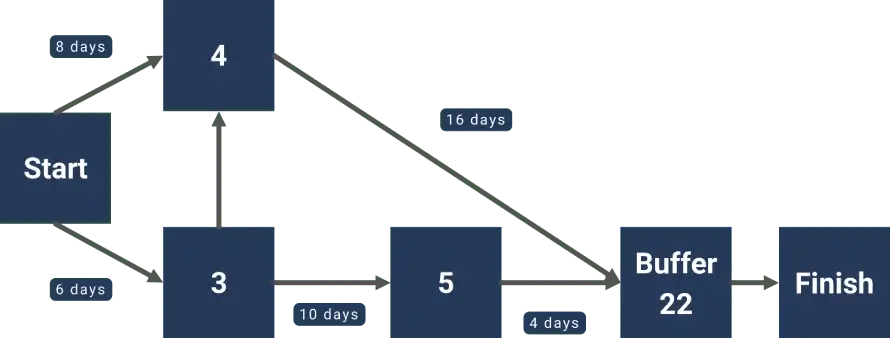
Critical Chain Project Management (CCPM) is a method that focuses on resource-based scheduling. It considers both task dependencies and resource constraints to optimise project schedules.Read more about these purposes
Differences from Critical Path Method
- CCPM considers resource constraints, while CPM focuses solely on task dependenciesAccept
- CCPM uses buffer time at the project level, rather than padding individual tasks
- CCPM aims to reduce multitasking and encourage early task completion.Deny
Both methods can provide useful insights for optimising project schedules and enhancing overall project management efficiency.
Tools for project schedulingView preferences
If you’re going to be doing project scheduling on a regular basis, you might find it useful to consider using specialist software to help you with this. A quick search online will pull up a range of tools. Some popular options include:
Project management software optionsSave preferences
- Jira : View preferencesAgile project management{title} software with customisable workflows and reporting.{title}
- Microsoft Project{title}: Software for creating detailed project schedules and resource management.Manage consent
- Other popular optionsManage consent: Trello, Asana, Basecamp, etc. All these offer various levels of functionality and can accommodate a range of project sizes.
Key features to look for in scheduling software
When it comes to choosing a scheduling software, there are some key features that you should ensure it has. Here are some of the most critical ones:
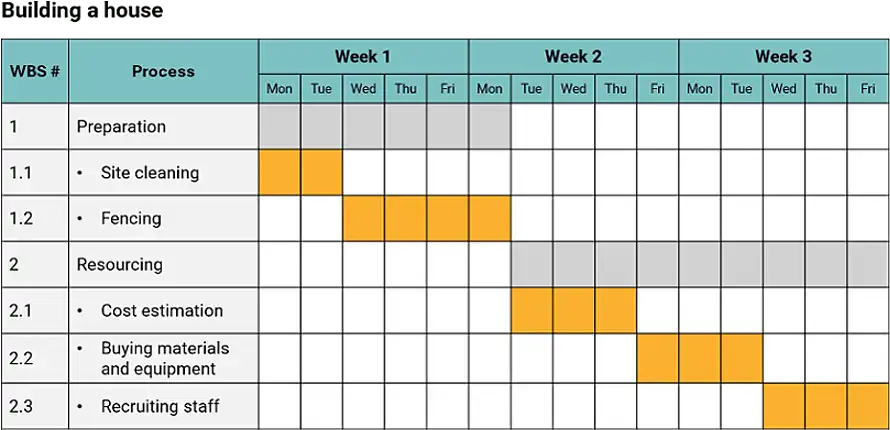
- Gantt chart creation and customisation
- Resource management
- Task dependencies
- Real-time collaboration
- Integration with other business tools
- Reporting and analytics.
If you can find a tool that covers all these bases, you’ll be well on your way to more streamlined and effective project scheduling.
Best practices for effective project scheduling
As with all things, there are several best practices you can follow that will help you improve the quality of your project scheduling. Here are some of the most important ones:
Collaborate with team members
Get your team involved in the scheduling process. Their input can be invaluable in terms of providing more accurate estimates for task durations and helping you to identify potential issues. This approach can also be helpful in terms of getting your team to buy-in to the schedule.
Break large tasks into smaller, manageable pieces
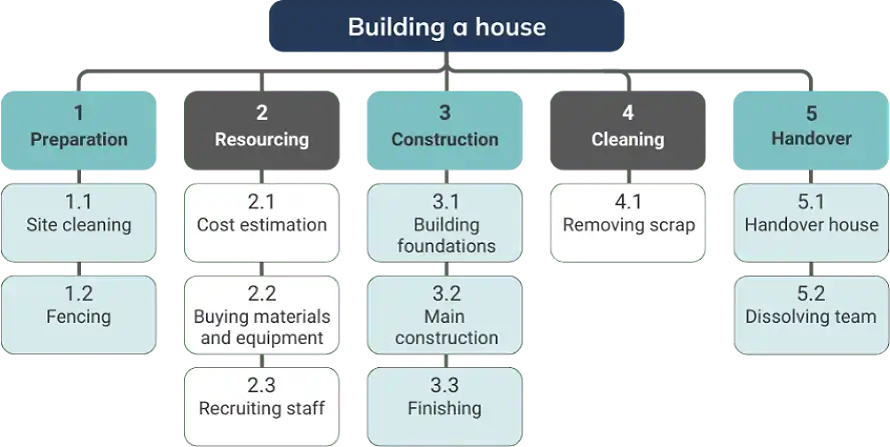
Break complex tasks into smaller and more manageable subtasks. This method, called Work Breakdown Structure (WBS), makes it easier to estimate the time, track progress, and allocate resources.
Consider dependencies and constraints
Identify and document all task dependencies and project constraints. This will help you to avoid scheduling conflicts and ensure that activities are logically sequenced.
Build in buffer time for unexpected delays
Include buffer time in your schedule to account for potential delays and unforeseen events. This will give you more flexibility in your schedule and help to avoid missed deadlines.
Regularly update and communicate schedule changes
Update your schedule regularly and communicate any changes to stakeholders. Schedule reviews are a critical part of the overall scheduling process and can help you to identify potential problems early on.
Following these best practices will help you to create better project schedules and ultimately lead to better project outcomes.
Common challenges in project scheduling
No matter how hard we try, it’s unlikely that we won’t encounter a few bumps when planning and managing a schedule. By being aware of the following common issues that typically affect project schedules, we will be more prepared and able to identify and address any we might encounter along the way.
Inaccurate time estimates
The biggest and most common cause for schedule slippage is making incorrect estimates, both too optimistically and too conservatively. As with all estimates, we should refer to historic data, as well as include the team and subject matter experts to provide an input on time estimates.
Scope creep
Scope creep can easily affect the schedule by adding new requirements into a project that are not fully evaluated and understood, that require uncommitted resources, or that are not approved.
Resource conflicts
Resource allocation problems are common on projects where the same resources are shared among multiple projects and activities. To resolve resource overallocation or conflicts, we can use resource levelling techniques to smoothen the demand for resources.
Unexpected risks and issues
Issues can unexpectedly appear despite your best-planned schedules. Prepare a detailed risk management plan that will help you address potential problems and issues on time.
If you identify these issues and incorporate the ways to mitigate them into your project management process, you will become a better scheduler, and your projects will reach completion more successfully.
Conclusion
Project scheduling is a vital aspect of successful project management. By grasping key concepts, using the right tools and following best practices, project managers can create effective schedules. Developing strong scheduling skills will lead to better resource allocation, risk management and overall project success. Keep refining your techniques and you’ll be well on your way to learning the art of project scheduling.
FAQs
How often should I update my project schedule?
Your schedule should be updated on a regular basis, ideally weekly or after major milestones or changes.
What’s the difference between a milestone and a task in project scheduling?
A task is a specific work item, while a milestone is a significant point or event in the project.
How can I handle unexpected delays in my project schedule?
Reassess priorities, reallocate resources if necessary and communicate changes to stakeholders as soon as possible.
Is it better to use software or manual methods for project scheduling?
Software is usually more efficient and accurate, particularly for complex projects.
How do I prioritise tasks within a project schedule?
Consider dependencies, resource availability and overall impact on project objectives.